

Features

Learn English through a layered system, not a single content format

Englingo is an English learning app that brings together audio lessons, vocabulary sets, grammar flows, reading practice, and pronunciation work inside one connected system. The goal is not just to show content, but to move learners through listening, reading, understanding, review, and active recall in a more structured way.

Each module has its own role, but the real value appears when they work together as one learning architecture.

Download on the App Store
Get it on Google Play
A girl studying English with Englingo

5 core learning areas

Audio LessonsVocabularyGrammarReadingPronunciation

Lessons do not end on the summary screen

In many lesson types, Flashcards, Learn, and Test open after the summary. That turns a single lesson into a deeper review system rather than a one-time pass through the material.

  • Lesson, review, and measurement work together
  • Wrong answers return into the next repetition loop
  • Lesson progress and vocabulary knowledge are tracked separately

Overview

What makes Englingo different is how the modules feed each other

Many English learning apps lean too heavily on one skill. Some mostly teach vocabulary, some stay inside listening, and some isolate grammar from actual usage.

Englingo connects these layers inside one system. While the learner moves through audio lessons, the related vocabulary and phrases can later return through cards, active exercises, and test flows. Grammar is not just a rule explanation either; it is reinforced through lesson cards, sub-lessons, and review modes. Reading and pronunciation also connect sound, meaning, and repetition inside the same structure.

That is why the experience feels more balanced

Instead of staying stuck in a single module, learners move between listening practice, vocabulary building, grammar study, reading practice, and pronunciation work in a more natural rhythm.

Five distinct skill layers

Audio Lessons, Vocabulary, Grammar, Reading, and Pronunciation move forward as separate modules.

Review is part of the lesson

Flashcards, Learn, and Test keep the content active instead of leaving it behind after one screen.

Progress is not just opened screens

Completed lessons and cumulative vocabulary knowledge are tracked together.

Core Modules

Five modules working together inside one learning system

These five modules form the foundation of Englingo’s learning architecture. Each one focuses on a different skill, but all of them support the same system.

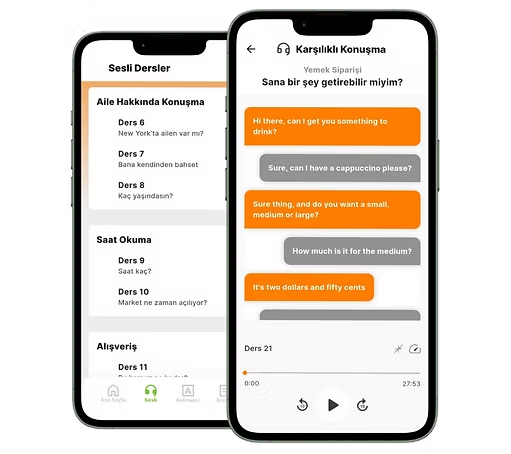
Englingo audio lesson screen

01 · Audio Lessons

Listening, dialogue, and review come together in the same lesson

The Audio Lessons module is the backbone of the app. In each lesson, learners can listen to the main audio, follow the dialogue on a speech screen, and revisit the same content through a separate review section.

Why it matters

This turns listening practice into more than a single play button. You hear the content, follow it, revisit it, and carry key words and phrases into later review flows.

  • Audio controls include forward and rewind options
  • Playback speed can be changed and listening progress is tracked
  • Words and phrases from the lesson continue into later review systems
Englingo vocabulary module screen

02 · Vocabulary

Vocabulary is learned through context and visual support

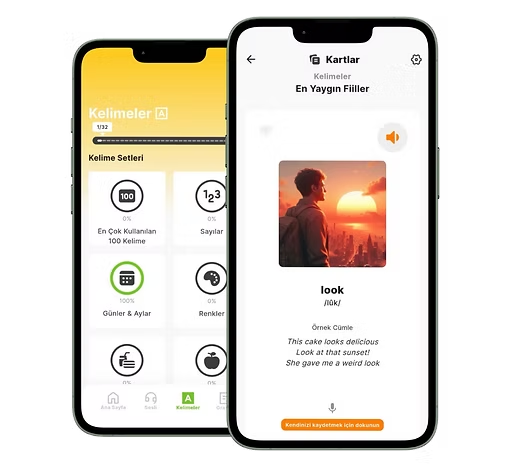
The vocabulary module is built around sets. Each set has its own icon and visible progress, so learners can clearly see where they are and how much they have completed.

Why it matters

Vocabulary becomes more useful when it is not reduced to a plain list. Seeing a word, hearing it, finding it inside an example sentence, and revisiting it later creates a deeper learning layer.

  • Progress is visible at the set level
  • Visual support makes words easier to distinguish and remember
  • Example sentences and pronunciation place words inside context
Englingo grammar module screen

03 · Grammar

Grammar is treated as a learning flow, not just a rules page

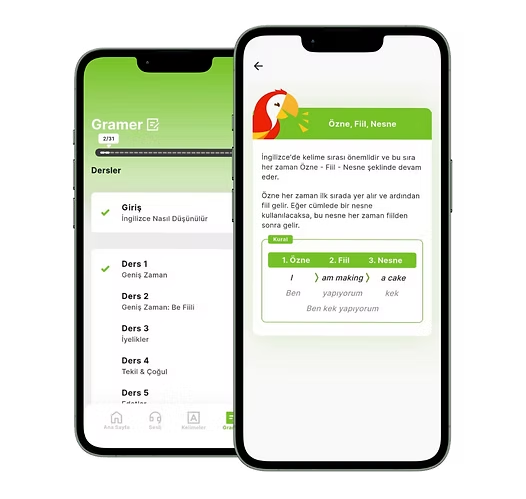
The grammar module uses intro screens, lesson cards, sub-lessons, and later review stages. Some grammar topics move through one lesson, while others are broken into smaller sub-lessons.

Why it matters

Grammar is not something you only read and move on from. Learners first understand the topic, then revisit the same structure through different repetition layers.

  • Topics are introduced through a guided lesson-card flow
  • Some content is split into sub-lessons for better pacing
  • Teaching, review, and testing remain connected inside the module
Englingo reading module screen

04 · Reading

Reading practice combines comprehension with voice repetition

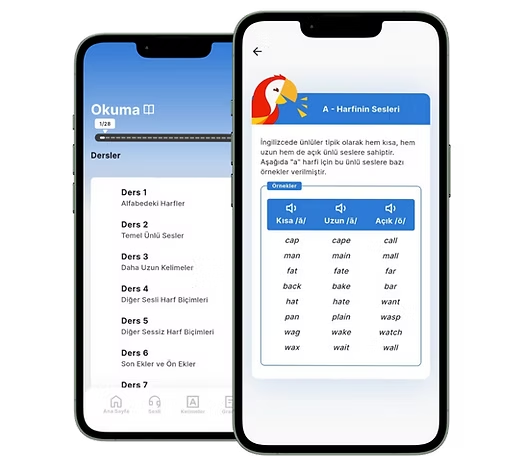
The reading module moves through sentence and text-based lessons. In some flows, the learner first reads the sentence or text out loud, then listens to the sample audio and repeats it.

Why it matters

There is a big difference between only scanning a sentence and actively producing it. This module makes reading more active and helps learners hear the rhythm of the language.

  • Sentence and text-based reading lessons are included
  • Learners can first read the content out loud on their own
  • Sample audio helps connect reading with pronunciation and listening
Englingo pronunciation module screen

05 · Pronunciation

Work on the correct sound at word level and hear it again

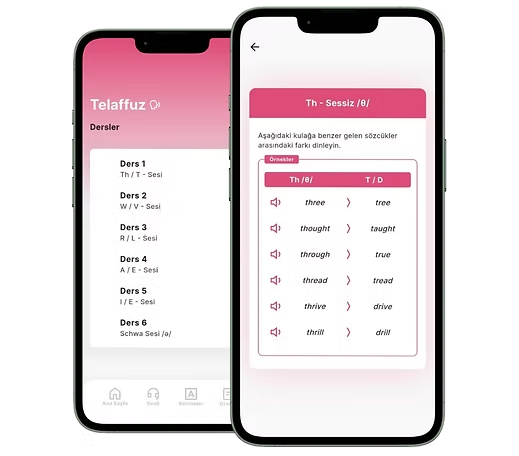
The pronunciation module focuses on hearing and repeating the correct sound at the word level. It begins with lesson cards and continues through pronunciation-focused review cards.

Why it matters

Pronunciation improvement does not come from seeing spelling alone. Repeatedly hearing the correct sound and comparing it to your own production creates much stronger awareness.

  • A pronunciation-focused lesson card flow is included
  • Flashcard-like repetition supports word-level practice
  • Learners can replay the correct sound as often as needed
Learning Cycle

See the lesson, process the content, then really work with it

One of Englingo’s strongest qualities is that learning is not limited to a single screen. When a lesson ends, the content continues through review layers and the learner shifts from passive viewing to active work.

1

Discover the lesson

You begin with an audio lesson, vocabulary set, grammar topic, reading flow, or pronunciation lesson. Intro screens and lesson cards clarify what you are about to study.

2

Listen, read, or learn the content

Inside the main lesson flow, you follow the text, hear the audio, and process the first layer of the material. The goal here is recognition and understanding.

3

Review with Flashcards

After the lesson summary, you move into cards, flip between front and back, hear the audio, view pronunciation, and optionally record your own voice.

4

Reinforce actively in Learn

The system gives you active tasks such as choosing words from visuals, identifying the right pronunciation, working through example sentences, or ordering words into a phrase.

Flashcards · Learn · Test

The review system is where Englingo becomes an active study tool

Many apps display content. Englingo carries that content into working modes that ask the learner to revisit, produce, and verify what they know. That is why Flashcards, Learn, and Test are not side features, but central parts of the product.

Flip, hear, shuffle, restart

Flashcards

Cards can be flipped front and back. Audio can play automatically, pronunciation can be shown, cards can be shuffled, and the whole set can be reset to unlearned if needed.

  • Smooth front and back card flow
  • Automatic audio playback and visible pronunciation
  • Shuffle support and restart-the-set behavior
  • Optional voice recording and playback for the learner

Active answer production

Learn

Learn mode is built around answering, not just viewing. Different exercise types create multiple paths into the material, and the system adapts as items are answered correctly or incorrectly.

  • Choose the word from a visual
  • Work through example sentences
  • Select the correct pronunciation or identify the heard letter
  • Put words in order to build a phrase

Checks whether it is truly remembered

Test

In Test mode, the learner has to produce or identify the right answer more directly. Wrong answers are tracked separately while correct ones move out according to the set logic.

  • Typed-answer flows
  • Write the word you hear
  • Choose the heard letter or structure
  • Check the correct answer and track weak points
Progress and Personalization

Visible progress makes the system easier to sustain

Englingo does not treat progress as a simple count of opened screens. Lesson-based progress and cumulative vocabulary knowledge are both tracked. Since correct answers can leave the set and wrong answers can return, the study surface naturally shifts toward what still needs work.

Lesson-based progress

The home area shows completed lesson progress, so learners can quickly see where they stand.

Cumulative vocabulary knowledge

A broader vocabulary knowledge metric is tracked based on learned material, helping progress feel more meaningful than simple screen completion.

Performance-shaped repetition

Inside Learn and Test, correct answers can drop from the active set while wrong answers return into the review cycle.

Language and profile settings

Learners can switch between Turkish and English interface options and manage key profile information inside the app.

Sound Experience

Hearing, rehearing, and listening back to your own voice matters here

One of the clearest ways Englingo separates itself from a simple vocabulary app is that sound is not treated as a minor extra. Audio lessons include player controls, pronunciation work allows repeated listening, reading can involve listening after speaking, and some review flows let learners record and replay their own voice.

The idea is simple but strong: not just seeing a word or phrase, but hearing it and producing it again when needed.

Player control

Rewind, forward, playback speed changes, and listening progress tracking make lesson audio more workable.

Replay the correct sound

In pronunciation and lesson flows, learners can hear the correct production again as needed.

Record your own voice

Flashcards can allow the learner to record and later replay their own voice without relying on unverified scoring claims.

Bridge reading and listening

Reading practice can move from the learner reading aloud to hearing the sample recording afterward, which builds a natural connection between sound and meaning.

Notifications and Routine

Notifications are designed to help learners return to the flow

The notification system works through messages planned around learner progress. There are reminders after the first entry point, return prompts when progress slows down, and next-step messages after lesson completion. Notifications can also lead directly into the relevant lesson screens.

Support the beginning

After first entry and early lesson activity, reminders help the learner settle into a routine.

Bring the learner back

When momentum slows down, the app can nudge the user back toward the relevant flow.

Point to the next step

After a lesson is completed, the system can suggest a logical next move instead of stopping at a generic message.

Deep-link into the right screen

Because notifications can route to relevant screens, returning to a lesson can feel more direct.

Premium

Free lets you enter the system. Premium unlocks the full structure.

Englingo follows a freemium model. Free content gives learners a way to understand the product, while premium opens the full range of lessons and review material. Since the modules are designed to support one another, premium value is about a more complete learning system, not just a larger content count.

A way into the system

Free start

Initial free content helps users explore the lesson flow, understand the learning style, and decide whether the structure fits them.

Entry through free starter content
A first look at lessons and repetition behavior
A lower-friction way to try the app

The full learning architecture

Premium access

Premium opens all audio lessons, all vocabulary cards, and the full grammar, reading, and pronunciation content set.

Access to all audio lessons
All vocabulary card content unlocked
Full grammar, reading, and pronunciation lessons
Monthly, 6-month, and yearly plans
Restore purchases and manage subscriptions

Premium makes sense because the strength of Englingo comes from the modules working together, not from one isolated feature.

FAQ

Frequently asked questions

These answers are based on the current, confirmed product scope.

The app is built around five core areas: Audio Lessons, Vocabulary, Grammar, Reading, and Pronunciation. That gives learners a more balanced system across listening, reading, structure, repetition, and sound work.

No. Vocabulary is one module, but the product also includes audio lessons, grammar flows, reading practice, and pronunciation work connected to review systems.

Yes. In many lesson types, Flashcards, Learn, and Test become available after the summary screen. These modes create different ways to revisit and work with the same material.

Yes. Audio Lessons include the main listening flow, dialogue screens, review sections, and playback controls. Reading and pronunciation also rely on sound as part of the lesson experience.

Yes. In Flashcards, learners can record and later replay their own voice. However, this should not be confused with unverified automatic scoring or speaking analysis.

Yes. The app supports switching between Turkish and English interface options.

Premium opens all audio lessons, all vocabulary cards, and the full grammar, reading, and pronunciation lesson content. It also fits into monthly, 6-month, and yearly plan structures.

The structured lesson and review flows make the app usable for beginners as well. Free starter content also gives learners a way to explore the system before going deeper.

Start now

Start learning English in a more structured, active, and lasting way

If you want one system that connects vocabulary, listening, reading, grammar, pronunciation, and review without scattering your effort, Englingo is built for that.

Download on the App Store
Get it on Google Play